Actions
Bug #1415
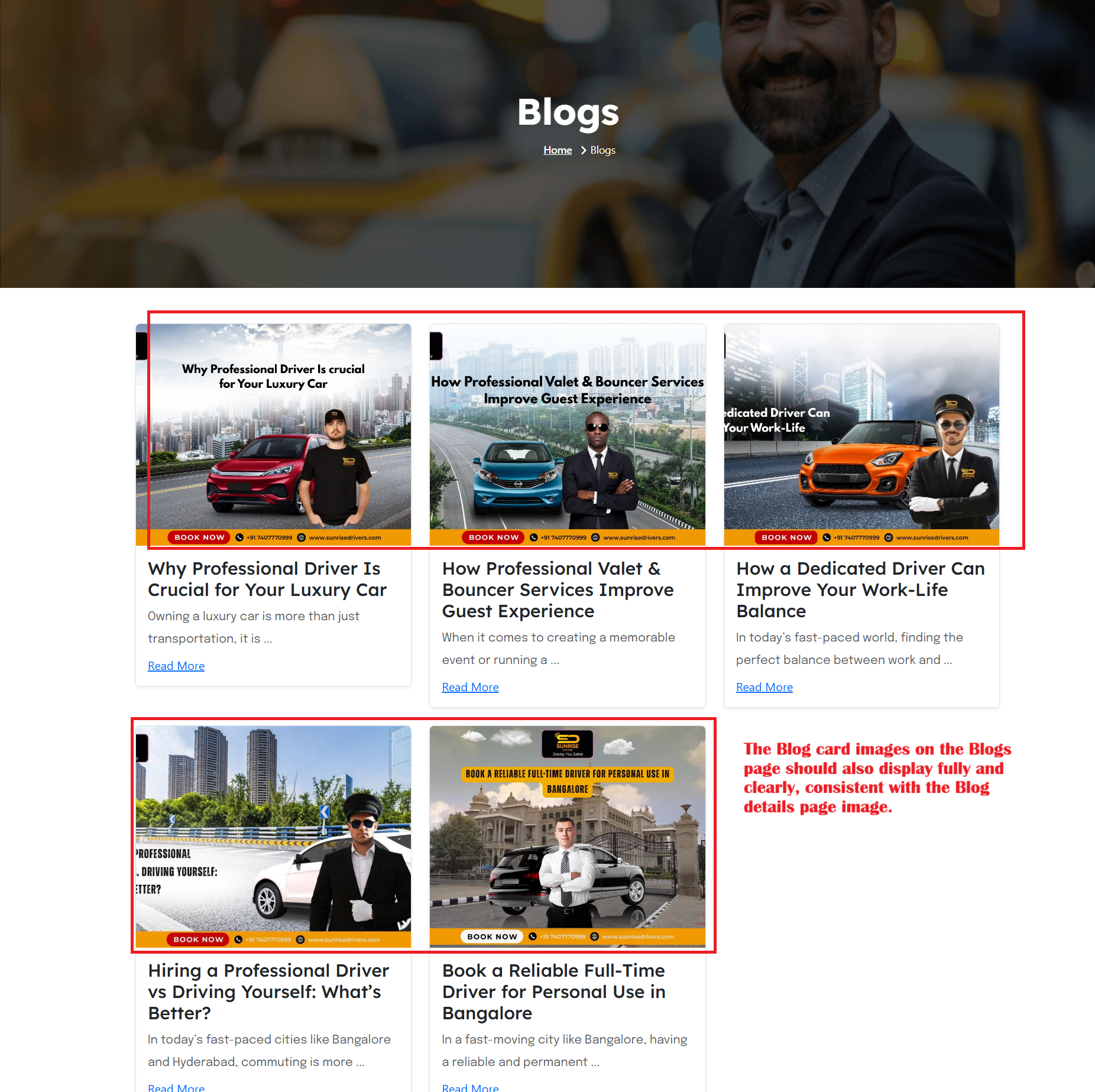
openFooter section –clicks on Blogs – Blog card images on Blogs page appear cropped, while Blog details page images display clearly issue:
Start date:
10/03/2025
Due date:
% Done:
0%
Estimated time:
Device/Browser/API:
Web Portal
Environment:
Production
Current Behaviour:
On the Blogs page, blog card images are not fully displayed (partially cropped / not clear).
- On the Blog details page, the blog image is displayed clearly and correctly.
Expected Behaviour:
Instead, the Blog card images on the Blogs page should also display fully and clearly, consistent with the Blog details page image.
Root Cause:
Funcational Gap
Root Cause Detail:
* On the Blogs page, blog card images are not fully displayed (partially cropped / not clear).
* On the Blog details page, the blog image is displayed clearly and correctly.
* Instead, the Blog card images on the Blogs page should also display fully and clearly, consistent with the Blog details page image.
Description
- On the Blogs page, blog card images are not fully displayed (partially cropped / not clear).
- On the Blog details page, the blog image is displayed clearly and correctly.
- Instead, the Blog card images on the Blogs page should also display fully and clearly, consistent with the Blog details page image.
Files
No data to display
Actions