Actions
Bug #1919
open(Job seeker) Dashboard page –Recent jobs section clicks on the view All button – Recent Jobs displays jobs on the last pagination page issue:
Start date:
12/19/2025
Due date:
% Done:
0%
Estimated time:
Device/Browser/API:
Web Portal
Environment:
Production
Current Behaviour:
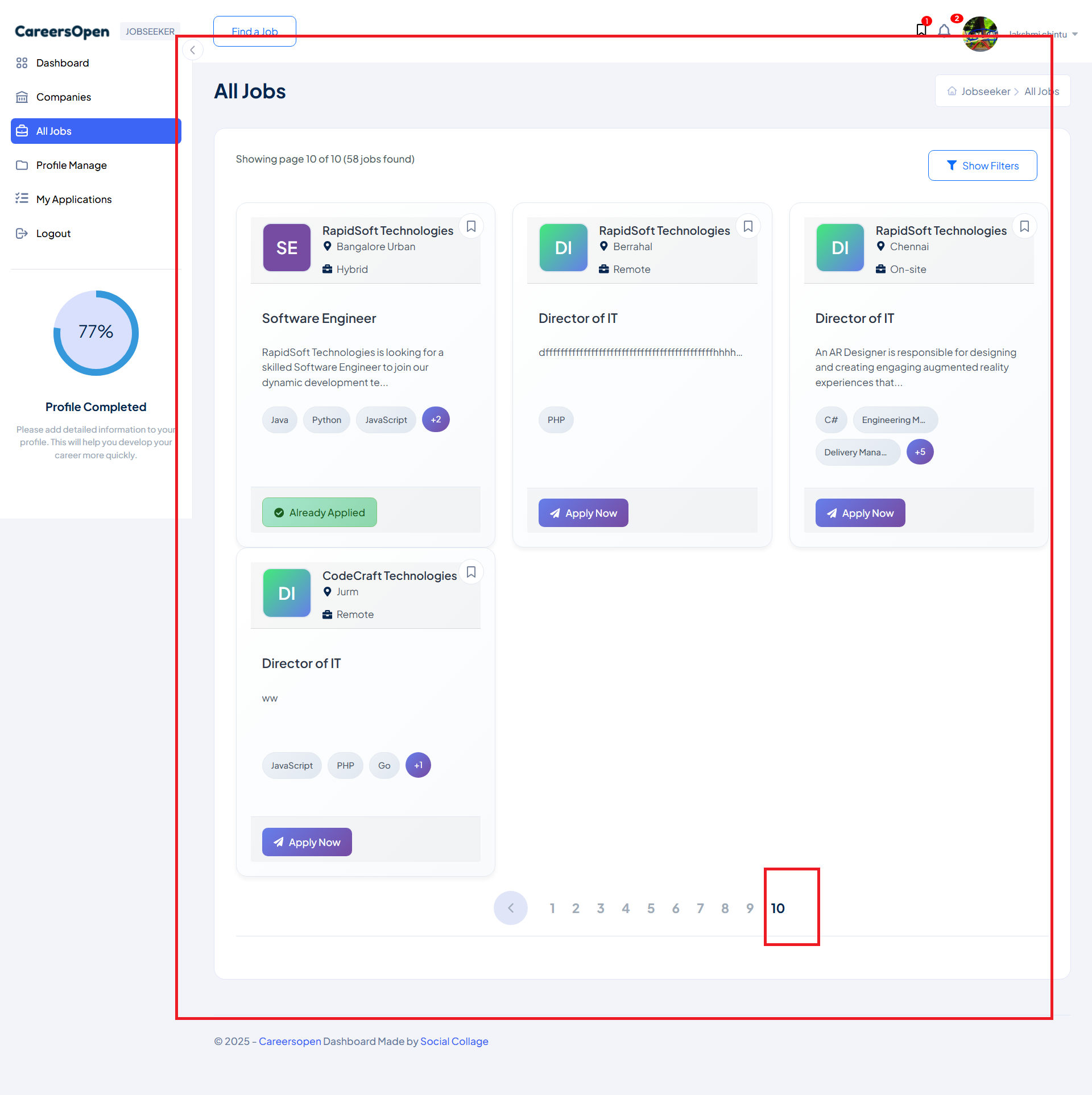
- On the (Job Seeker) Dashboard page, clicking the View All button in the Recent Jobs section redirects to the All Jobs page.
- However, the jobs shown are displayed on the last page of the All Jobs. This creates confusion, as recently viewed/posted jobs are not immediately visible.
Expected Behaviour:
Instead, the Clicking the View All button in the Recent Jobs section should navigate to the All Jobs page.
- The recent jobs should be displayed on the first page (or at the top of the list) for better visibility and user experience.
Root Cause:
Funcational Gap
Root Cause Detail:
* On the (Job Seeker) Dashboard page, clicking the View All button in the Recent Jobs section redirects to the All Jobs page.
* However, the jobs shown are displayed on the last page of the All Jobs. This creates confusion, as recently viewed/posted jobs are not immediately visible.
* Instead, the Clicking the View All button in the Recent Jobs section should navigate to the All Jobs page.
* The recent jobs should be displayed on the first page (or at the top of the list) for better visibility and user experience.
Description
- On the (Job Seeker) Dashboard page, clicking the View All button in the Recent Jobs section redirects to the All Jobs page.
- However, the jobs shown are displayed on the last page of the All Jobs. This creates confusion, as recently viewed/posted jobs are not immediately visible.
- Instead, the Clicking the View All button in the Recent Jobs section should navigate to the All Jobs page.
- The recent jobs should be displayed on the first page (or at the top of the list) for better visibility and user experience.
Files
.png)
No data to display
Actions