Actions
Bug #2385
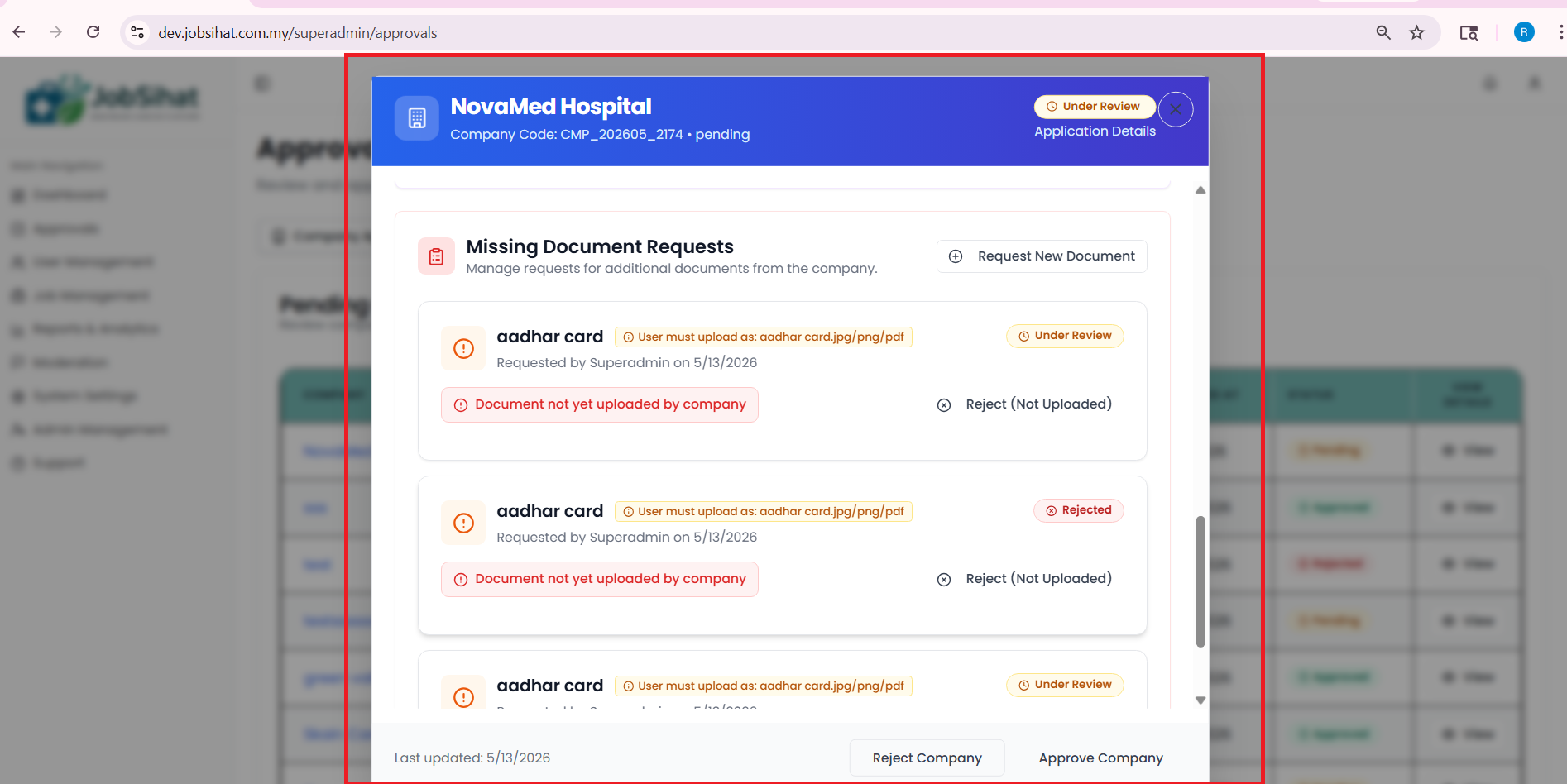
open(Admin/Super Admin) Approval Pending Section – Uploaded Missing Documents Not Displayed issue:
Start date:
05/15/2026
Due date:
% Done:
0%
Estimated time:
Device/Browser/API:
Web Portal
Environment:
Dev
Current Behaviour:
- Uploaded missing documents are not displayed in the Approval Pending section, and the status still shows “Document not yet uploaded by the company.”
Expected Behaviour:
- Uploaded missing documents should be displayed correctly in the Approval Pending section with updated status and uploaded file visibility for Admin/Super Admin review.
Root Cause:
Funcational Gap
Root Cause Detail:
* Uploaded missing documents are not displayed in the Approval Pending section, and the status still shows “Document not yet uploaded by the company.”
* Uploaded missing documents should be displayed correctly in the Approval Pending section with updated status and uploaded file visibility for Admin/Super Admin review.
Description
- Uploaded missing documents are not displayed in the Approval Pending section, and the status still shows “Document not yet uploaded by the company.”
- Uploaded missing documents should be displayed correctly in the Approval Pending section with updated status and uploaded file visibility for Admin/Super Admin review.
Files

No data to display
Actions