Bug #2639
openDashboard – Insights Displays Incorrect Data When "All Channels" Is Selected
0%
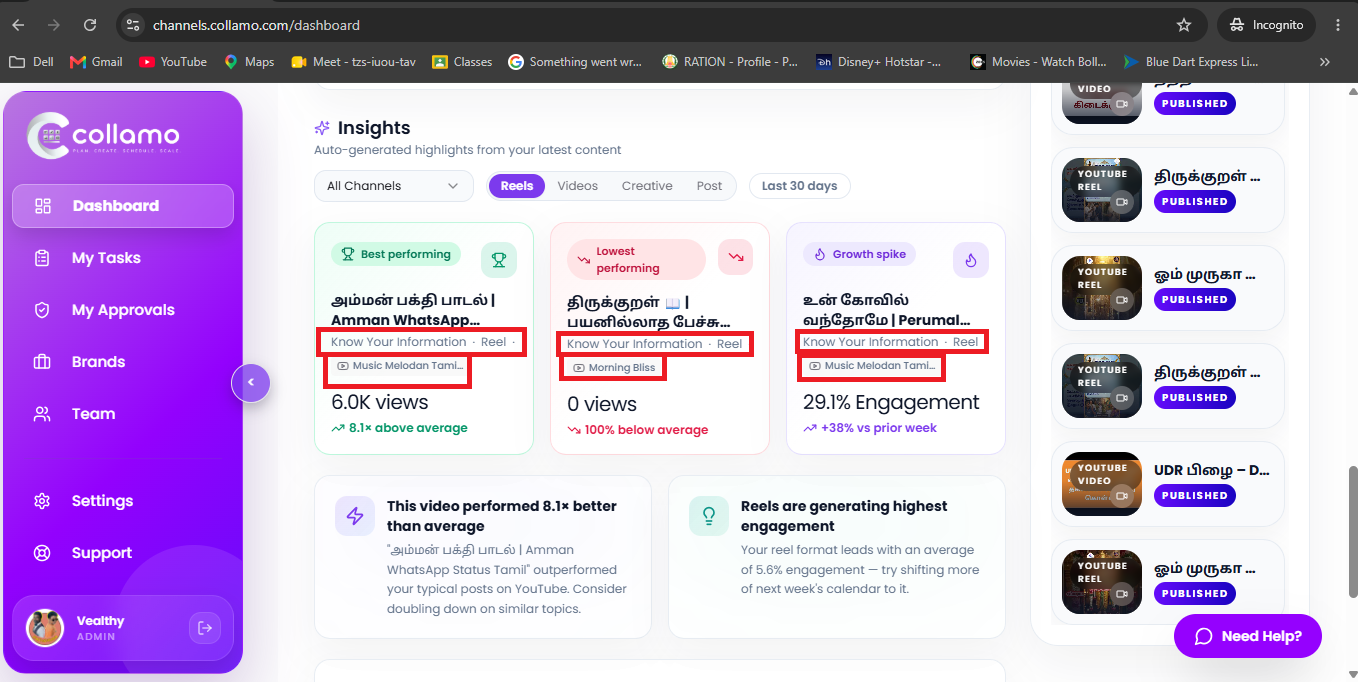
In the Dashboard → Insights section, when the All Channels option is selected, the Best Performing, Lowest Performing, and Growth Spike widgets display incorrect or mixed channel data.
When All Channels is selected, the Best Performing, Lowest Performing, and Growth Spike sections should accurately display aggregated or correctly filtered data for all selected channels without mixing or duplicating channel information.
In the Dashboard → Insights section, when the All Channels option is selected, the Best Performing, Lowest Performing, and Growth Spike widgets display incorrect or mixed channel data.
Description
In the Dashboard → Insights section, when the All Channels option is selected, the Best Performing, Lowest Performing, and Growth Spike widgets display incorrect or mixed channel data.
Files