Actions
Bug #2613
open(Mobile Browser) – Team – Invite Member Form Alignment Issue:
Status:
Resolved
Priority:
P2-High
Assignee:
Lakshmi prasanna V
Start date:
06/26/2026
Due date:
% Done:
0%
Estimated time:
Device/Browser/API:
Mobile Browser
Environment:
UAT
Current Behaviour:
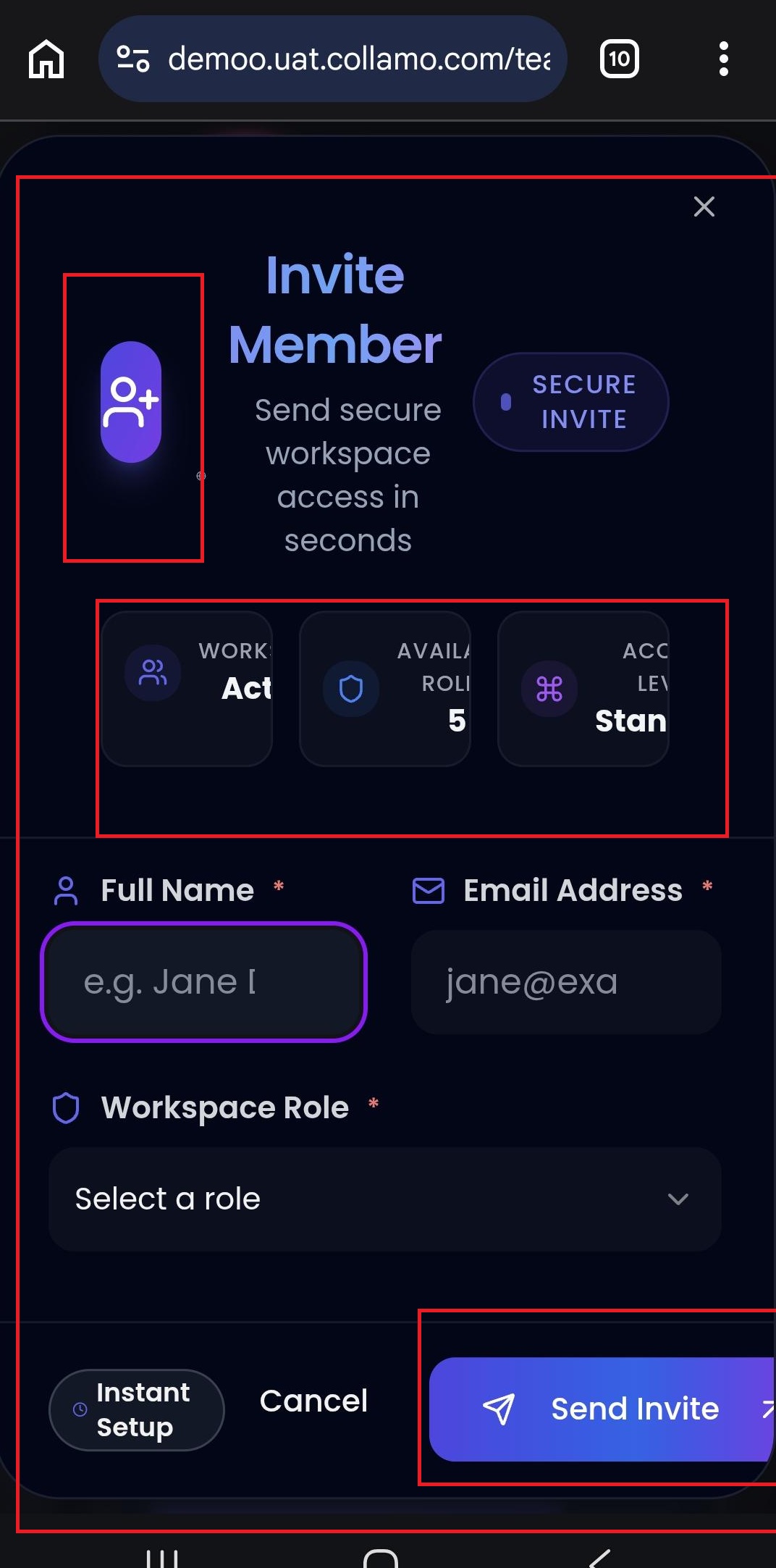
- When the user clicks the Invite Member button, the Invite Member form is not properly aligned on the mobile browser, and some content appears cut off.
Expected Behaviour:
- The Invite Member form should be properly aligned on mobile devices, with all text, icons, fields, and information cards fully visible and displayed without overlap or truncation
Root Cause:
Funcational Gap
Root Cause Detail:
* When the user clicks the Invite Member button, the Invite Member form is not properly aligned on the mobile browser, and some content appears cut off.
* The Invite Member form should be properly aligned on mobile devices, with all text, icons, fields, and information cards fully visible and displayed without overlap or truncation.
Description
- When the user clicks the Invite Member button, the Invite Member form is not properly aligned on the mobile browser, and some content appears cut off.
- The Invite Member form should be properly aligned on mobile devices, with all text, icons, fields, and information cards fully visible and displayed without overlap or truncation.
Files
Updated by Admin Access 5 months ago
- Status changed from Assigned to Dev_Inprogress
Updated by Admin Access 5 months ago
- Status changed from Dev_Inprogress to Resolved
Updated by Admin Access 5 months ago
- Assignee changed from Theegala Asritha to Lakshmi prasanna V
Actions